
Color Swatches That Convert
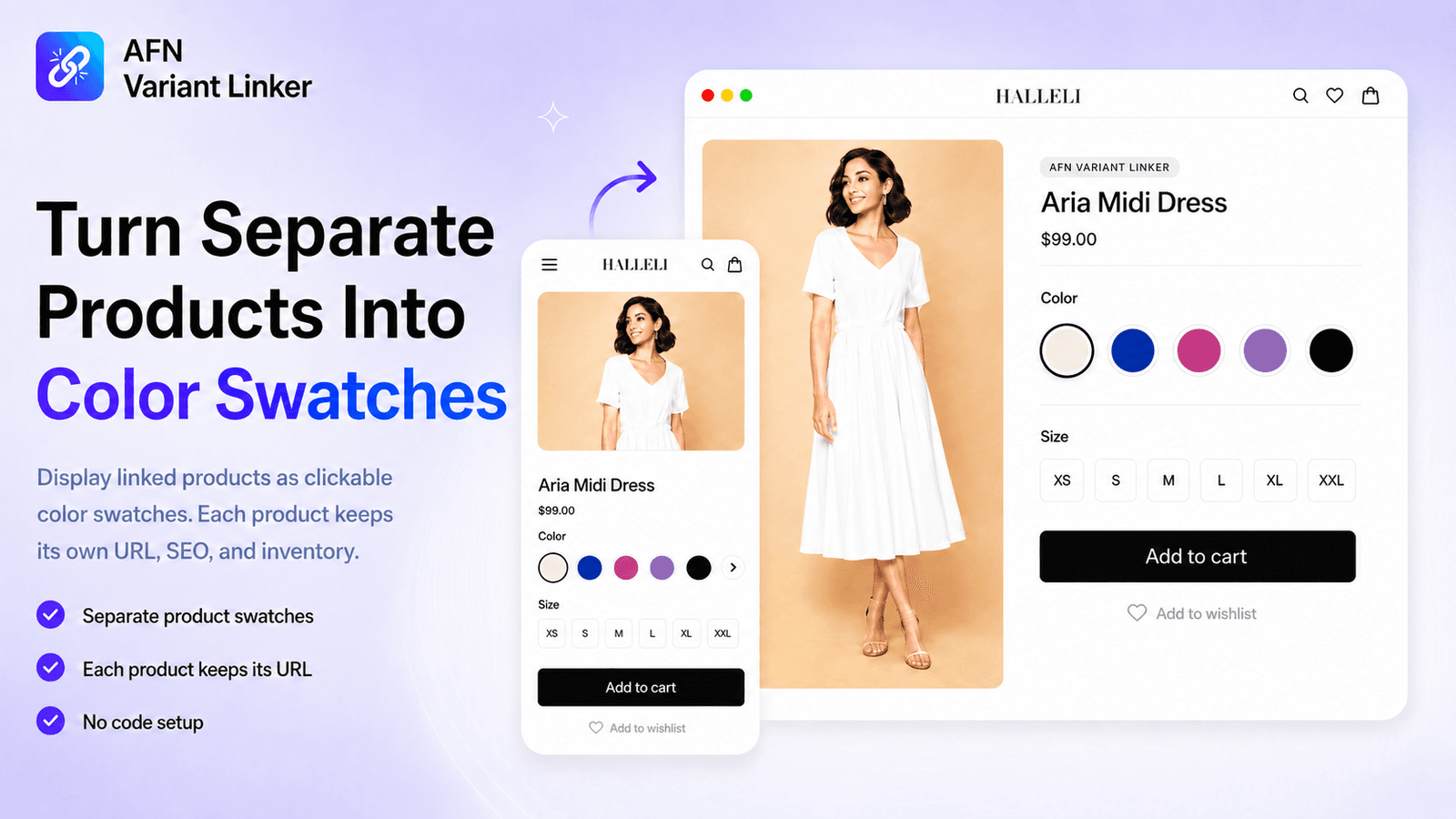
Connect separate Shopify products and display them as color swatches, image swatches, or variant selectors on product pages, collection pages, and featured collection grids. Help shoppers compare colors or styles before opening each product while keeping each product's own URL, SEO, inventory, and product setup.
About the App
What is AFN Variant Linker?
AFN Variant Linker lets you connect separate Shopify products and display them as color swatches, image swatches, or variant selectors on product pages, collection pages, and featured collection grids. Help shoppers compare colors or styles before opening each product while keeping each product's own URL, SEO, inventory, and product setup.
Shopify's built-in variant system combines all options under a single product URL with shared inventory. This works for simple stores, but creates problems when you need each variant to have its own product page for SEO, separate inventory tracking, or independent analytics.
AFN Variant Linker solves this by keeping every product fully independent while visually connecting them across your storefront. Shoppers see swatches on product pages and collection grids, and can compare options at a glance. Behind the scenes, each product retains its own URL, search engine indexing, stock levels, pricing, and analytics data.
The app works with any Shopify Online Store 2.0 theme and installs as a native app block through the Theme Editor. No code, no Liquid edits, and no theme conflicts. Setup takes under a minute.
The Problem
Why Shopify Merchants Need Product Linking
One URL for all variants
Shopify's built-in variants put all colors and sizes under one product URL. Only one page gets indexed by Google, limiting your organic search visibility.
No color preview on collections
Shoppers browsing collection pages can't see available colors without clicking into each product. More clicks, slower browsing, and missed conversions when options aren't visible upfront.
Limited analytics per variant
When all variants share one product, you lose visibility into which specific color or style drives the most traffic, clicks, and conversions.
Shared inventory and management
Tracking stock across combined variants makes it harder to manage reorders, pricing, and product setup, especially across different colors or materials.
One URL for all variants
Shopify's built-in variants put all colors and sizes under one product URL. Only one page gets indexed by Google, limiting your organic search visibility.
No color preview on collections
Shoppers browsing collection pages can't see available colors without clicking into each product. More clicks, slower browsing, and missed conversions when options aren't visible upfront.
Limited analytics per variant
When all variants share one product, you lose visibility into which specific color or style drives the most traffic, clicks, and conversions.
Shared inventory and management
Tracking stock across combined variants makes it harder to manage reorders, pricing, and product setup, especially across different colors or materials.
Features
Everything AFN Variant Linker Can Do
From swatches and smart grouping to CSV migration, Shopify Flow, and built-in analytics. A complete toolkit for linking products, all without code.
Color & Image Swatches
Link separate products and show them as color swatches or image swatches on product pages. Each product keeps its own URL, SEO, and inventory.
Collection Page Swatches
Display swatches on collection and featured collection product cards so shoppers compare options at a glance without opening each product.
Visual Grid Display
Show linked products as image cards right on the product page. Shoppers compare options and switch products without leaving the page.
Find Groups Automatically
Scan your catalog for products that look like variants of each other and create suggested link groups in just a few clicks.
CSV Import & Export
Export every link group to a spreadsheet for backups or bulk edits, then import to update groups or move a setup between stores.
Shopify Flow Automation
Trigger automated workflows when products are added to a link group. Tag, notify, or sync with your existing Flow actions.
Sold-Out Controls
Choose how sold-out items appear across your store. Show, hide, cross out, or badge them with custom wording, synced to your inventory.
Independent Products
Each linked product stays fully separate with its own URL, SEO metadata, inventory counts, and product setup. Nothing gets merged.
Product Interest Analytics
Track clicks, views, and engagement with built-in analytics, including device breakdown, top products, and trends.
Swatch Labels in 11 Languages
Name each swatch with hover tooltips, with built-in labels available in 11 languages for international storefronts.
Product Admin Block
Manage link groups directly inside the Shopify product admin. See linked products and jump to the right group in one click.
No-Code Theme Setup
Install as a native app block through the Theme Editor on any Online Store 2.0 theme. No Liquid edits, no code, no theme conflicts.
Visual Grid
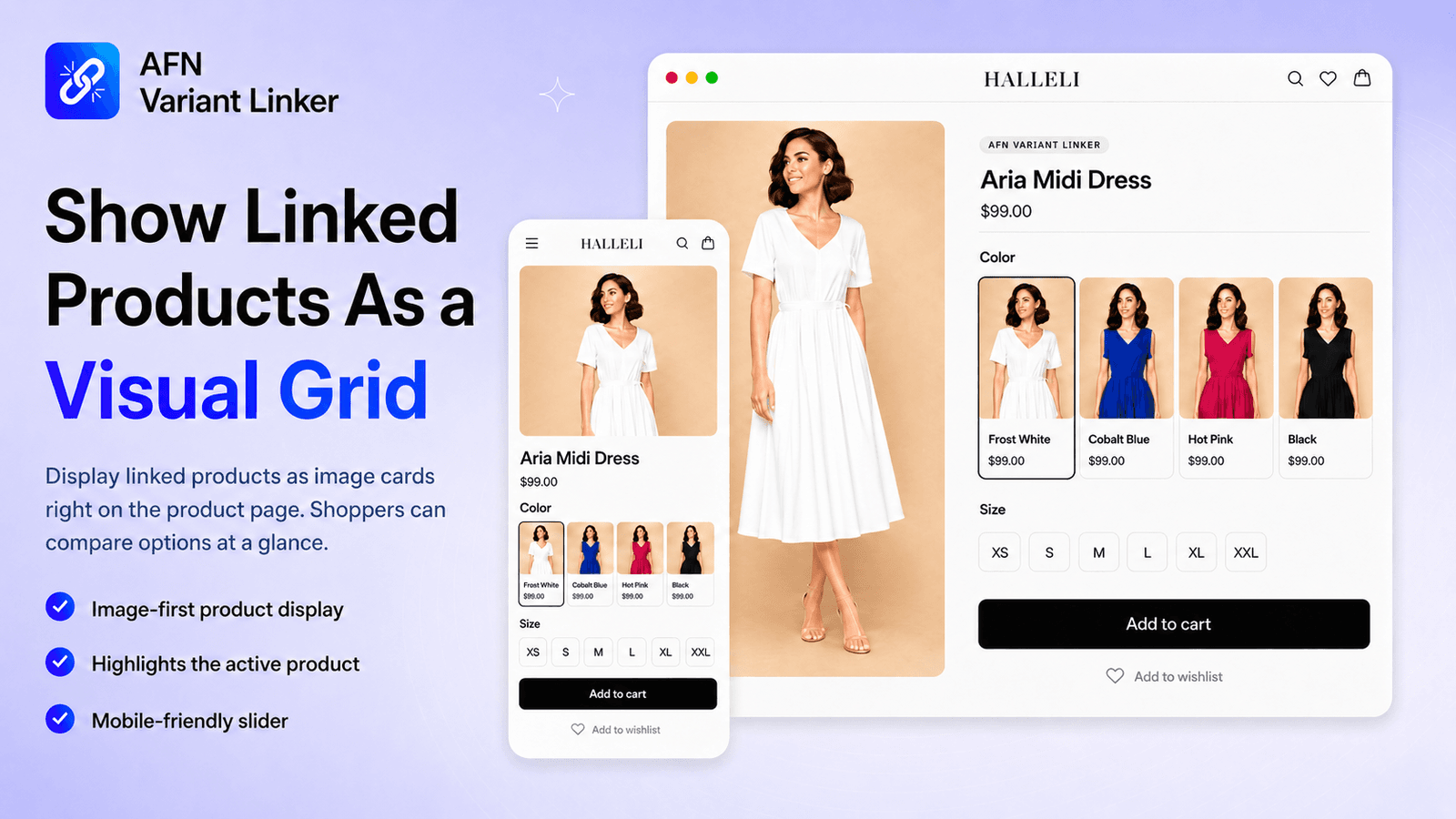
Show Linked Products As a Visual Grid
Display linked products as image cards right on the product page. Shoppers can compare options at a glance and switch between products without leaving the page.
Collection Pages
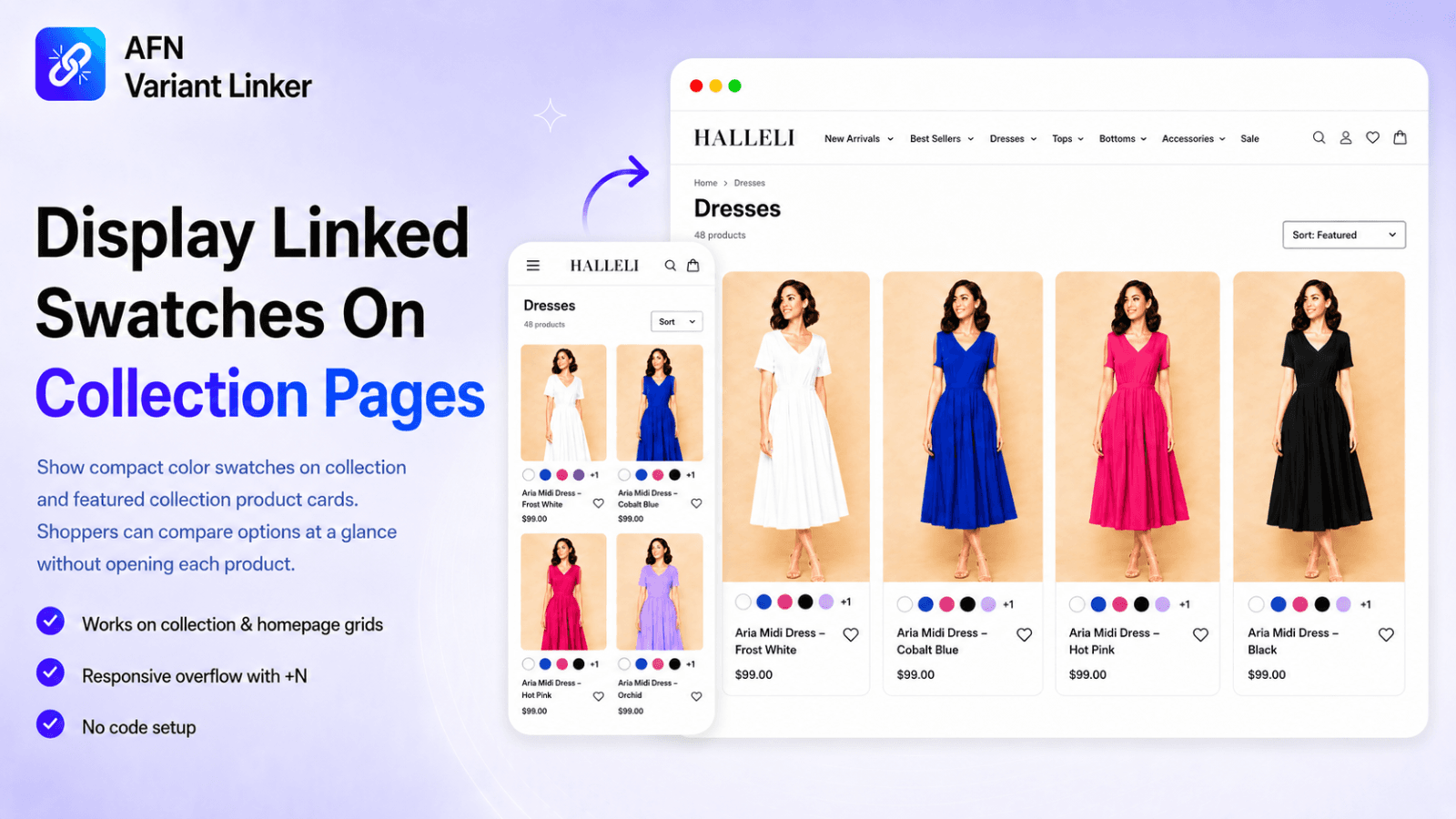
Display Linked Swatches On Collection Pages
Show compact color swatches on collection and featured collection product cards. Shoppers can compare options at a glance without opening each product.
Inventory Sync
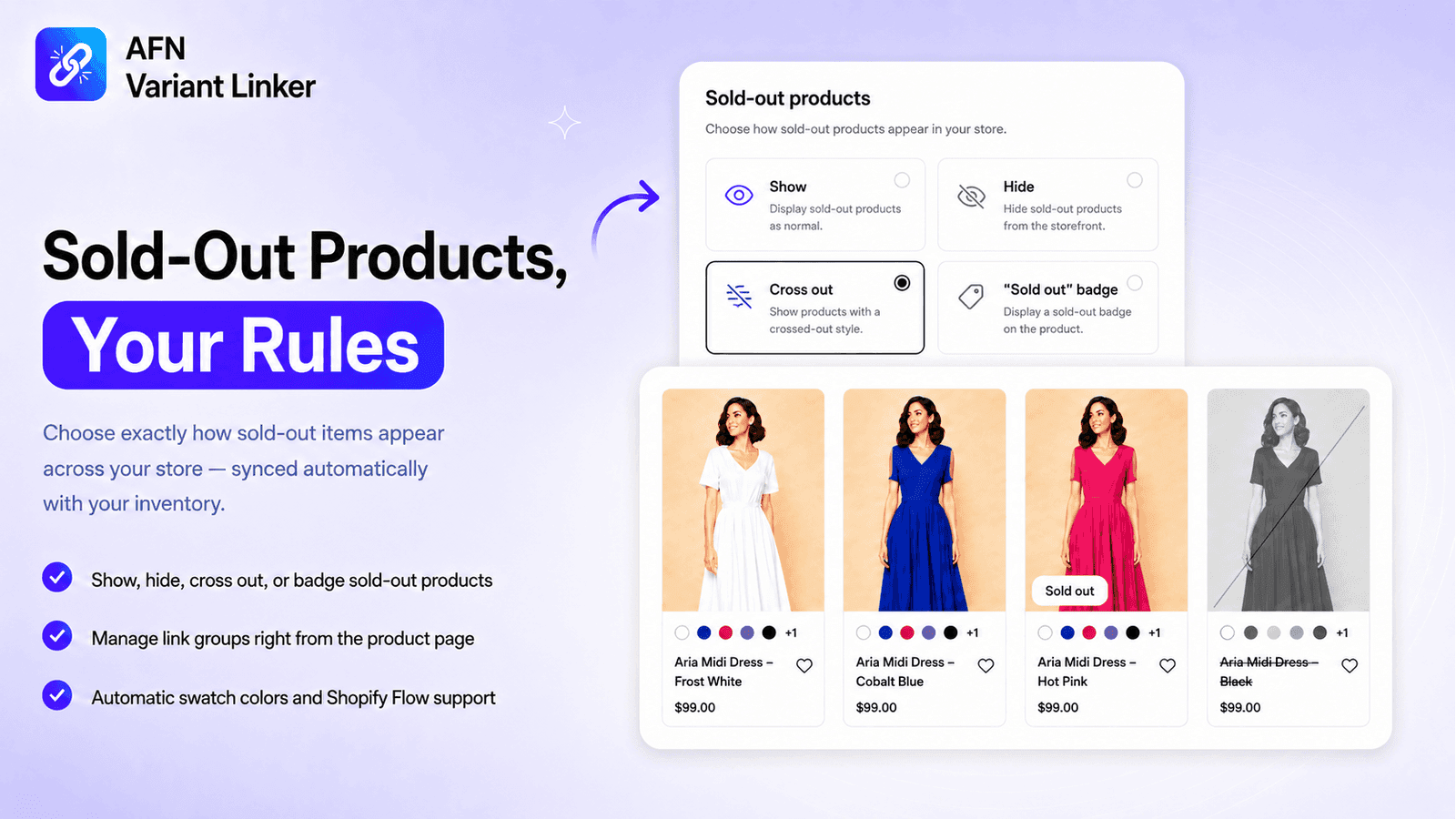
Sold-Out Products, Your Rules
Choose exactly how sold-out items appear across your store, synced automatically with your inventory.
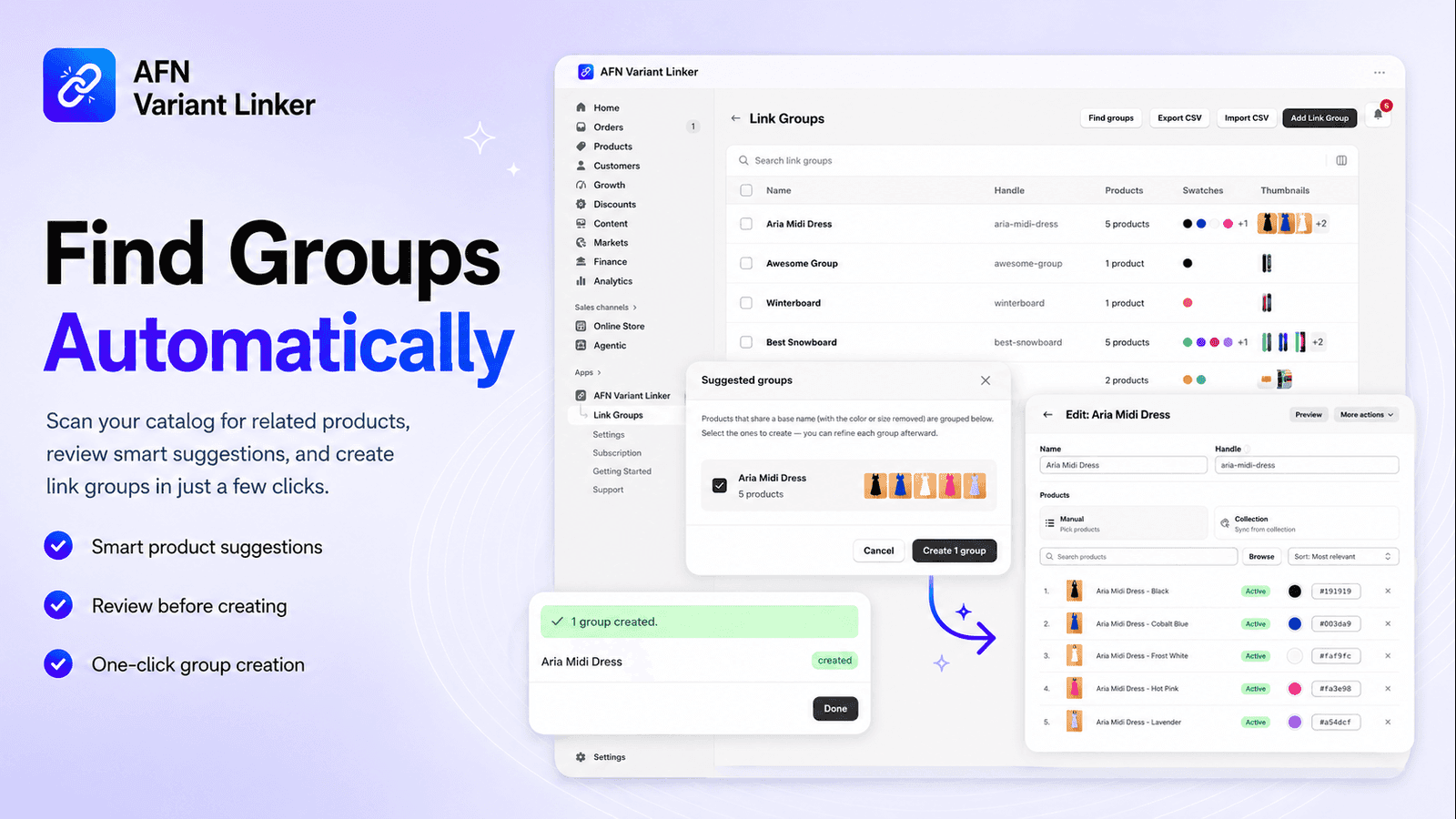
Auto-Discovery
Find Groups Automatically
Scan your catalog for related products, review smart suggestions, and create link groups in just a few clicks.
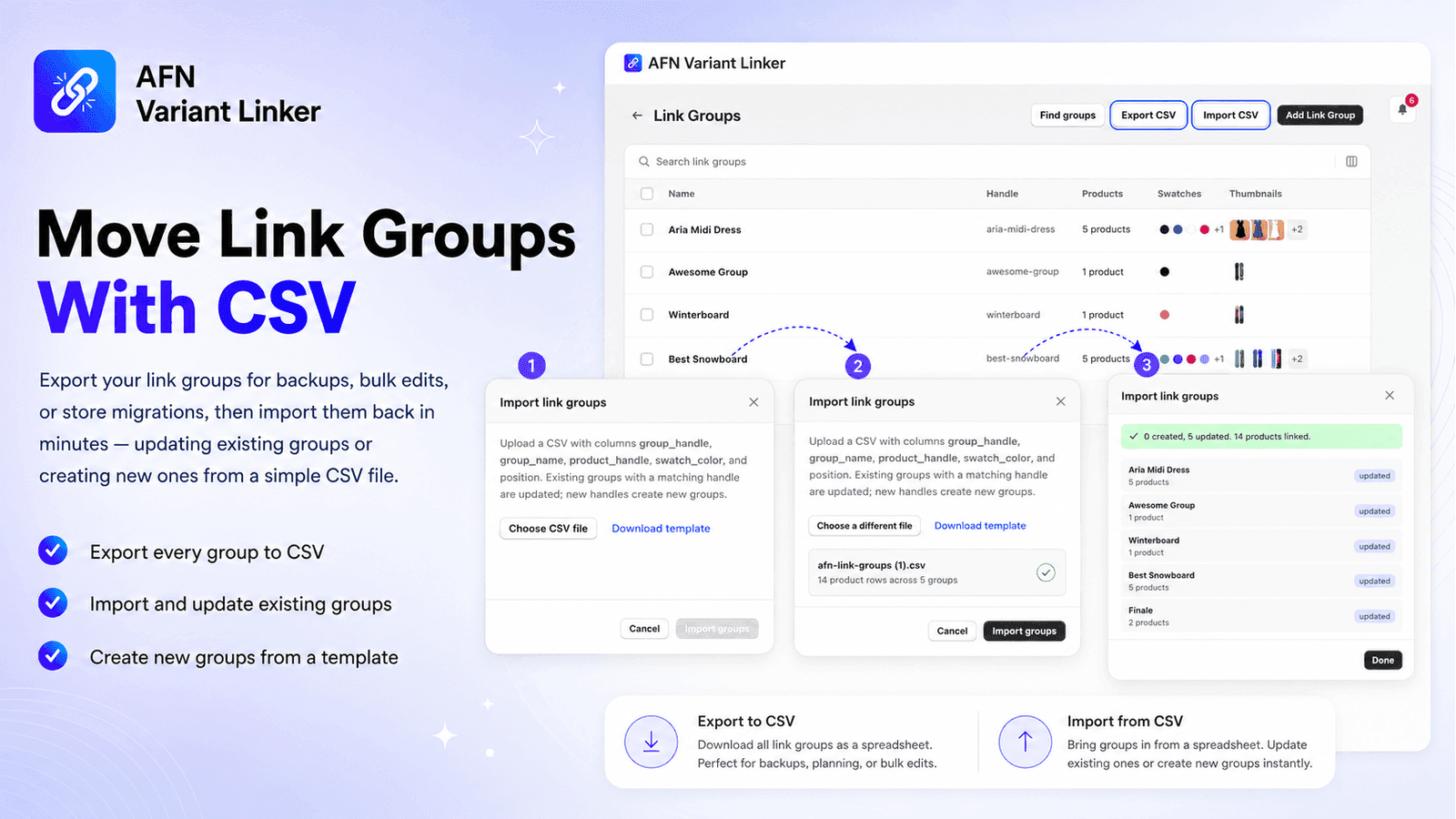
Import & Export
Move Link Groups With CSV
Export your link groups for backups, bulk edits, or store migrations, then import them back in minutes. Update existing groups or create new ones from a simple CSV file.
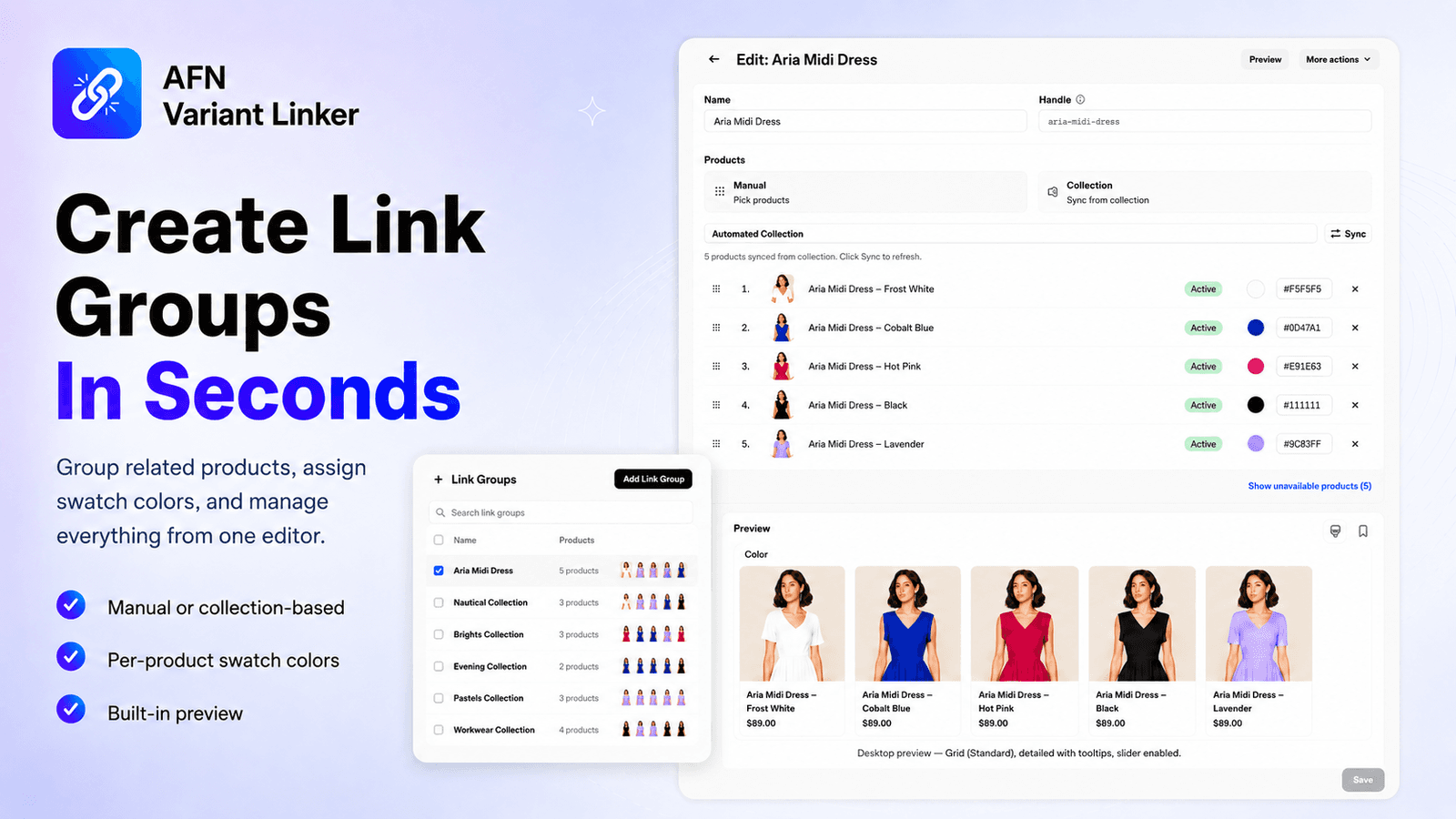
Simple Setup
Create Link Groups in Seconds
Group related products, assign swatch colors, and manage everything from one editor. Manual or collection-based sourcing, per-product color pickers, and built-in preview.
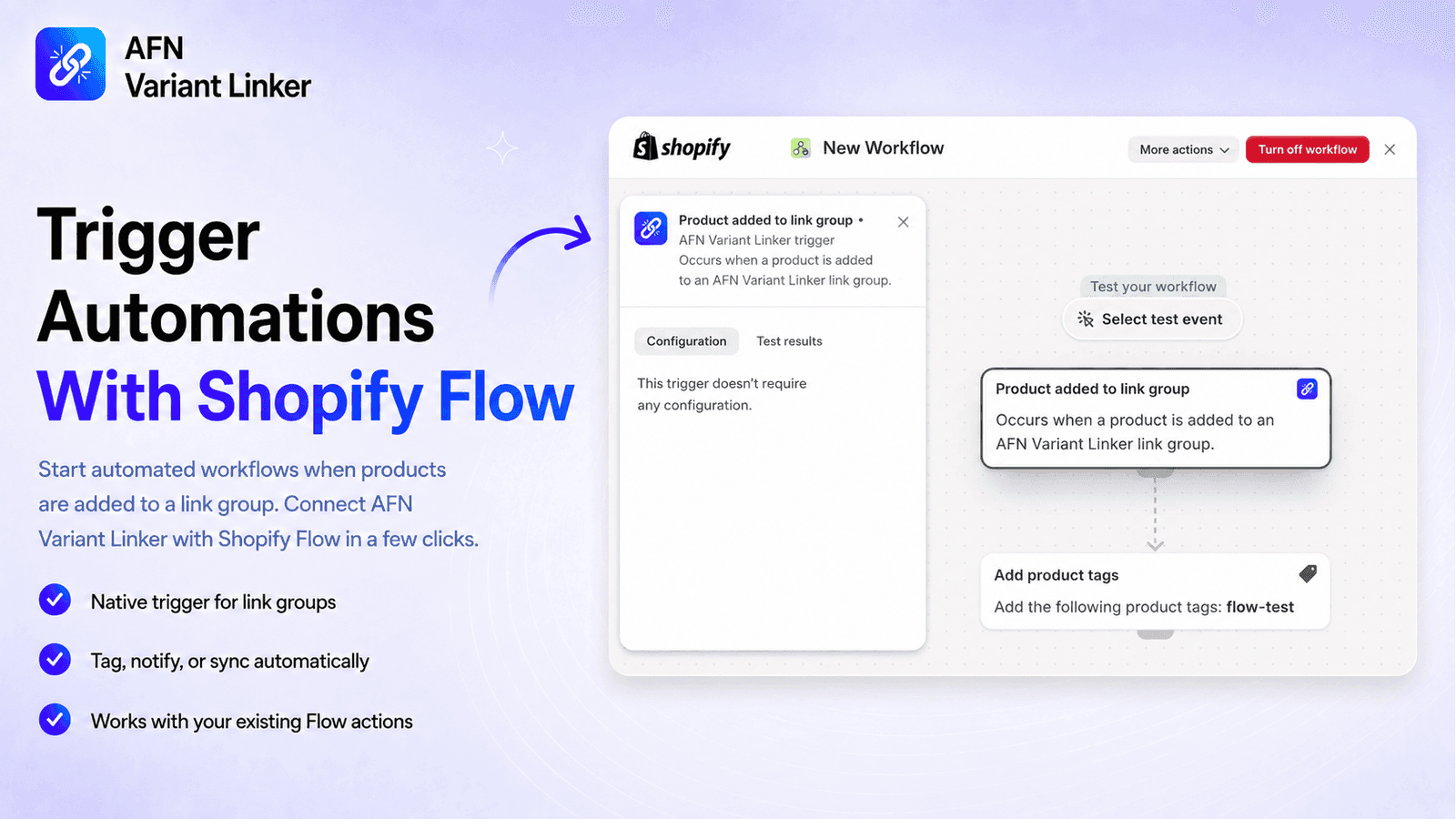
Shopify Flow
Trigger Automations With Shopify Flow
Start automated workflows when products are added to a link group. Connect AFN Variant Linker with Shopify Flow in a few clicks.
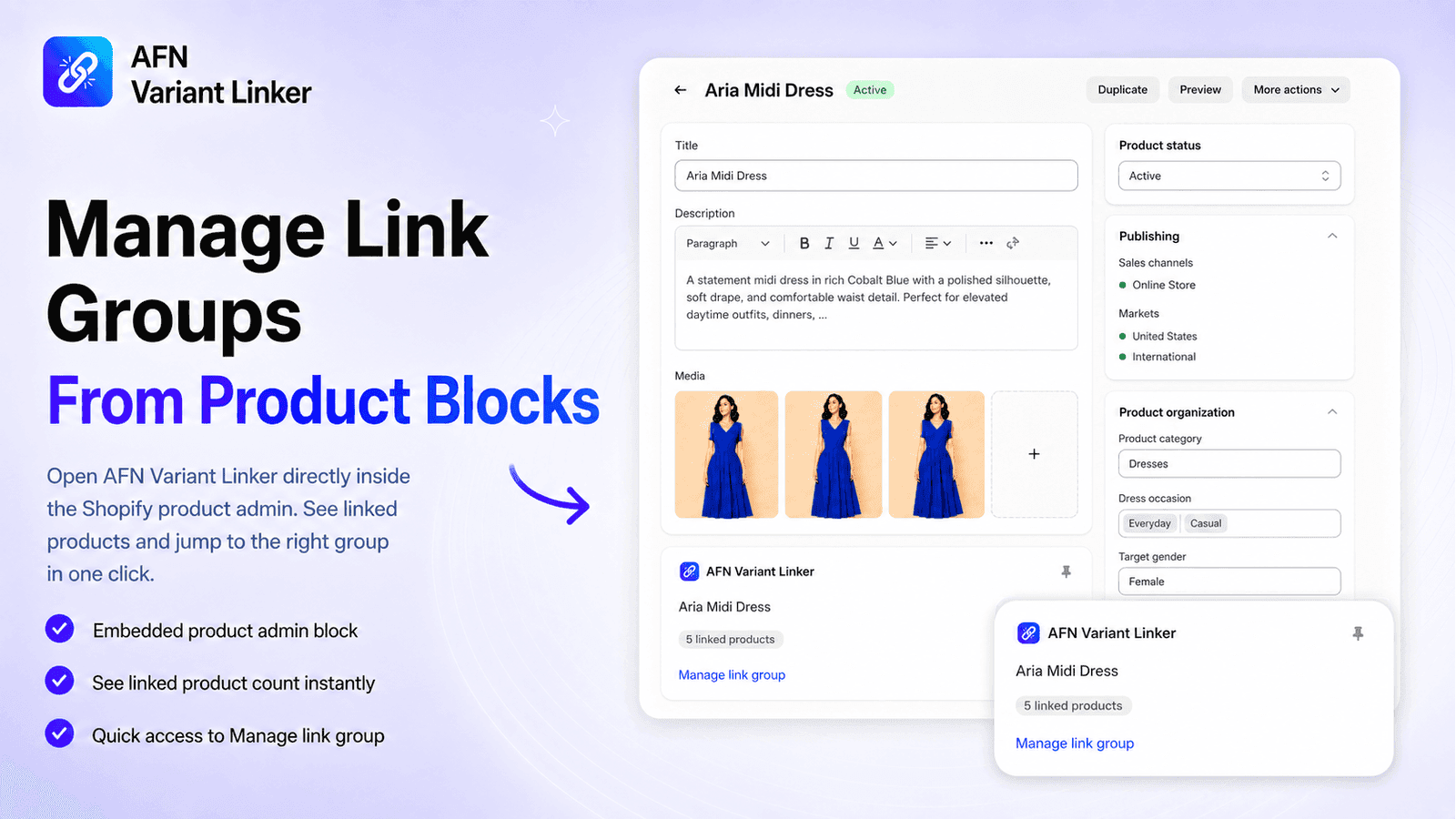
Product Admin
Manage Link Groups From Product Blocks
Open AFN Variant Linker directly inside the Shopify product admin. See linked products and jump to the right group in one click.
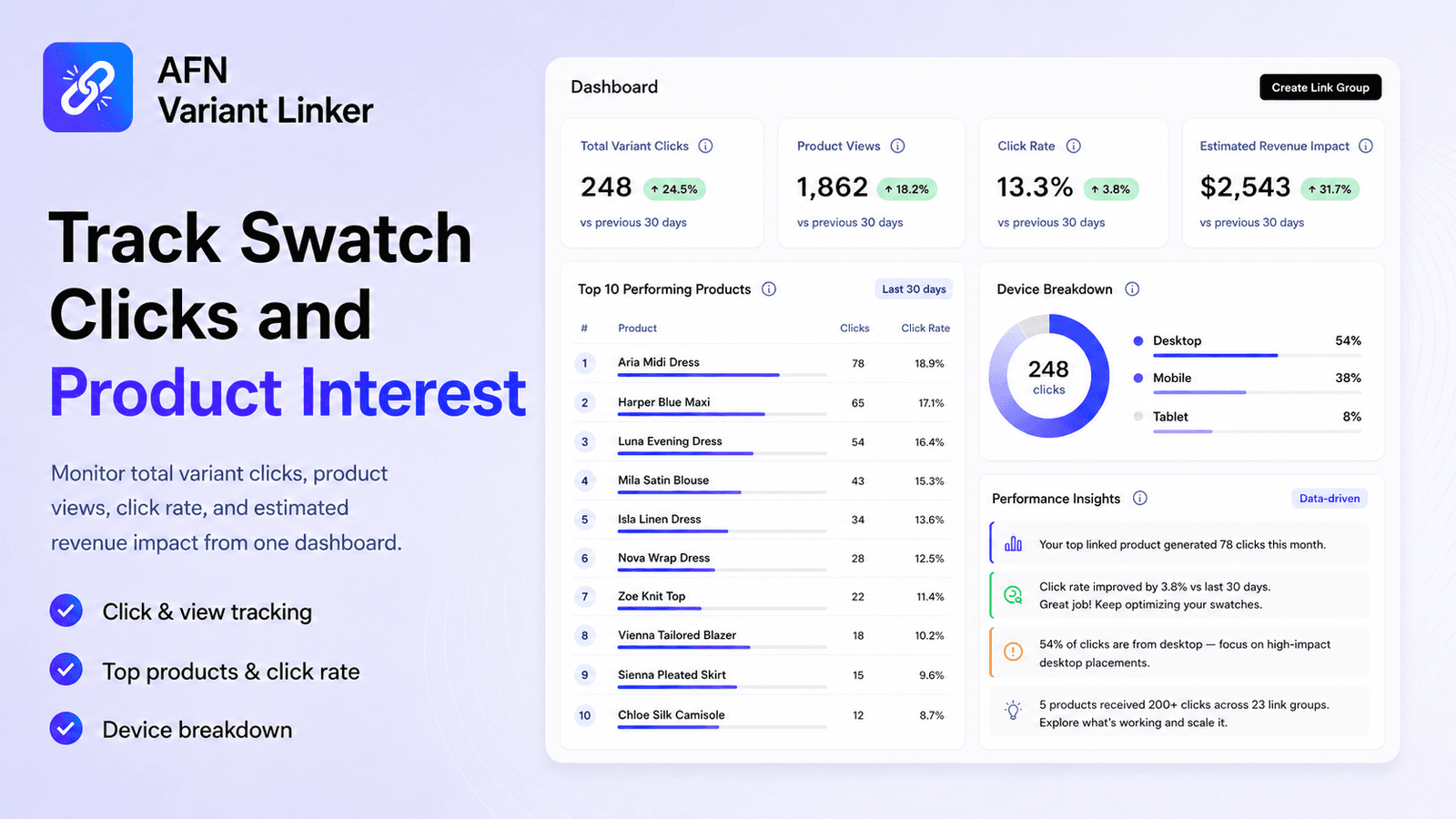
Analytics
Know What's Working
Monitor total variant clicks, product views, click rate, and estimated revenue impact from one dashboard. See device breakdown and top-performing products at a glance.
Use Cases
See What Each Feature Can Do for Your Store
Illustrative scenarios showing how the app's features come together to solve everyday merchandising problems. These are hypothetical examples, not real stores, so use them as inspiration for your own catalog.
Showing all 8 scenarios
Turn 6 separate color products into one connected choice
Challenge
A fashion brand sells its bestselling tee as six separate products, one per color. A shopper landing on the navy page has no way to know the other five colors exist, so many leave thinking it comes in one option.
With AFN Variant Linker
They built a Link Group with all six tees and gave each a swatch color. Every product page now shows the full color row with hover tooltips naming each one, and clicking a swatch jumps straight to that color.
Result
Every color is reachable from every product page. No more dead-end pages where shoppers only see one option.
Clean up a collection page cluttered with near-identical cards
Challenge
A homeware store has a “Throw Pillows” collection that shows 8 cards for a single pillow available in 8 colors, pushing other products below the fold and making the page feel repetitive.
With AFN Variant Linker
They added the AFN Collection Swatches block, then turned on Collapse duplicates. The grid now shows one card per group with a built-in color picker. The duplicates are hidden, but every color is still one tap away.
Result
A tidier, more varied collection page with one card per style, while shoppers still reach all 8 colors from the swatch row.
Show real prints when a flat color can't tell the story
Challenge
A textiles brand sells cushions in woven patterns and prints. A single solid-color dot can't represent a floral or a herringbone weave, so the swatches look misleading.
With AFN Variant Linker
They switched Swatch appearance to Image swatches. Each swatch now shows the product's own photo inside the circle, so shoppers see the actual fabric. Products without a photo fall back to their color automatically.
Result
Swatches that look like the real product. Patterns and textures are obvious before a shopper even clicks.
Keep seasonal stock looking intentional, not broken
Challenge
An outdoor gear store sees popular colors sell out mid-season. Leaving them as normal swatches causes “why is this unavailable?” confusion, but hiding them makes the range look thin.
With AFN Variant Linker
They set sold-out products to show a badge, and on Growth replaced the label with their own wording, “Back soon” for restocks and “Pre-order” for incoming lines. The color a shopper is viewing always stays visible.
Result
Sold-out colors stay on display with clear, on-brand messaging, and update themselves as orders come in.
Manage hundreds of shades without the busywork
Challenge
A cosmetics brand with 200+ lipstick shades as separate products finds that setting a swatch color by hand for each, and keeping groups tidy, is hours of work.
With AFN Variant Linker
Because each product had a Category color set, new swatches pre-filled automatically. The team manages groups straight from the product page with the AFN Link Group admin block, and a Shopify Flow automation tags every product the moment it joins a group.
Result
Setup that scales with the catalog. Colors fill themselves in, and group membership drives downstream automations.
Decide which colors to feature using real engagement data
Challenge
An activewear store guesses at which colors to promote on the homepage and in ads, with nothing to back the decision.
With AFN Variant Linker
They used the analytics dashboard, the top clicked products table, 14-day trend, and device breakdown, plus performance insights, to see which linked colors shoppers actually explore.
Result
Merchandising choices backed by how shoppers interact with swatches instead of guesswork. Engagement metrics are an interest indicator, not sales figures.
Set up dozens of color groups without building each by hand
Challenge
A store has 300 products where every colorway is its own product, such as “Aria Midi Dress - Black” and “Aria Midi Dress - Cobalt Blue”. Creating a Link Group for each style by hand would take hours.
With AFN Variant Linker
They clicked Find groups. AFN scanned the catalog and suggested ready-made groups by matching products that share a base name once the color or size is removed. They reviewed the list, kept the ones that looked right, and created them in a single click.
Result
Hours of manual grouping done in minutes, and because only ungrouped products are suggested, nothing gets duplicated.
Move an entire variant-linking setup between stores
Challenge
An agency is rebuilding a client's shop and needs to recreate 40 Link Groups exactly, the same products, swatch colors, and order, without redoing every group by hand.
With AFN Variant Linker
They used Export CSV on the old store to download every group as a spreadsheet, then Import CSV on the new one. Matching handles updated existing groups and new handles created fresh ones, carrying swatch color and position across in the same columns.
Result
A 40-group setup recreated in one import instead of an afternoon of manual rebuilding, and the same CSV doubles as an off-platform backup.
Hypothetical examples, not real stores. Growth-only features are marked.
How It Works
Up and Running in Three Steps
Install the App
Add AFN Variant Linker to your Shopify store from the App Store. Setup takes under a minute.
Create Link Groups
Group products manually or click Find groups to create suggested groups automatically. Assign swatch colors and drag to reorder.
Add to Your Theme
Drop the app block into any product page through the Theme Editor. No code or Liquid edits needed.
Install the App
Add AFN Variant Linker to your Shopify store from the App Store. Setup takes under a minute.
Create Link Groups
Group products manually or click Find groups to create suggested groups automatically. Assign swatch colors and drag to reorder.
Add to Your Theme
Drop the app block into any product page through the Theme Editor. No code or Liquid edits needed.
Compatibility
Works with Any Online Store 2.0 Theme
AFN Variant Linker integrates through the Shopify Theme Editor as a native app block. No Liquid edits, no code injections, no theme conflicts. Just add the block to your product page and configure it visually.
SEO Advantage
Better SEO with Separate Product Pages
When you use Shopify's built-in variants, all product options share a single URL. Search engines can only index that one page, which limits your organic visibility. With AFN Variant Linker, each product variant has its own dedicated URL with unique title tags, meta descriptions, and content.
More indexable pages
Each product gets its own URL that Google can crawl and rank independently.
Unique metadata per variant
Separate title tags and meta descriptions targeting different search queries.
Better long-tail coverage
Target specific searches like ‘blue cotton t-shirt’ with dedicated product pages.
Clearer analytics per product
Track which specific products drive traffic, clicks, and conversions.
More indexable pages
Each product gets its own URL that Google can crawl and rank independently.
Unique metadata per variant
Separate title tags and meta descriptions targeting different search queries.
Better long-tail coverage
Target specific searches like ‘blue cotton t-shirt’ with dedicated product pages.
Clearer analytics per product
Track which specific products drive traffic, clicks, and conversions.
Pricing
Simple, Transparent Pricing
Start free. Upgrade when you need more.
Starter
Free
Try linked product swatches with limits
- Up to 3 Link Groups
- Up to 6 Products per group
- Product page color swatches
- Collection & homepage grid swatches
- Sold-out display controls
- One-click theme setup
- Find groups with smart suggestions
- Export link groups to CSV
- Swatch labels in 11 languages
- Basic analytics with estimated engagement value
Growth
$12.99/month
7-day free trial included
Everything in Starter, plus:
- Unlimited Link Groups
- Unlimited Products per group
- Image swatches (product photos)
- Custom sold-out badge text
- Collapse duplicates on collections
- Import link groups from CSV
- Advanced analytics & insights
- Device breakdown, trends & top products
- 30-day analytics history
- Priority support
FAQ
Frequently Asked Questions
AFN Variant Linker lets you connect separate Shopify products and display them as color swatches, image swatches, or variant-style selectors on the product page, with compact color swatches on collection and homepage grids. Each product keeps its own URL, SEO, inventory, and product setup while customers switch between options in one smooth shopping experience.
Shopify’s built-in variant system combines all options under a single product URL with shared inventory. AFN Variant Linker keeps each product fully independent with its own URL, SEO metadata, inventory counts, and analytics. This gives you more control over product organization and better search engine visibility.
Yes. AFN Variant Linker works with any Shopify Online Store 2.0 theme, including Dawn, Sense, Craft, Refresh, and Spotlight. It integrates through the Theme Editor as a native app block, so no code or Liquid edits are needed.
No. The app is designed to be configured from the Shopify admin and Theme Editor. No Liquid edits, no code injections, no theme conflicts.
No. Each product can only belong to one link group. If you add a product that’s already in another group, it will show a “Linked” badge. When you save, the app automatically moves it to the new group and removes it from the previous one.
Yes. On the Link Groups page, click Find groups and AFN Variant Linker scans your catalog for products that look like variants of each other, products that share a base name once the color or size is removed (for example ‘Aria Midi Dress - Black’ and ‘Aria Midi Dress - Cobalt Blue’). Review the suggestions, untick anything you don’t want, and create the groups in one click. Only products that aren’t already in a group are suggested, so nothing gets duplicated.
Yes. Export CSV downloads every link group as a spreadsheet, with one row per product and columns for the group, product handle, swatch color, and position. Use it as a backup, for bulk edits, or to move a setup between stores. Import CSV brings groups back in, where matching handles update existing groups and new handles create new ones. Export is available on every plan, and Import is included with Growth. A single file supports up to 50 groups and 5,000 product rows.
Yes. AFN Variant Linker includes click tracking so you can understand how customers interact with linked products. The Growth plan unlocks advanced analytics with device breakdown and top product performance.
AFN Variant Linker offers a free Starter plan with up to 3 link groups, 6 products per group, swatch and grid display, and basic analytics. The Growth plan at $12.99/month unlocks unlimited link groups, unlimited products per group, advanced analytics, device breakdown, top product performance, priority support, and estimated revenue impact. The Growth plan includes a 7-day free trial.
The analytics dashboard is on the home page. Starter plan shows 7-day basic stats. Growth plan unlocks 30-day advanced analytics with device breakdown, top products, and CRO insights.
Open your theme editor and add the “AFN Collection Swatches” block to your collection template or Featured Collection homepage section. Swatches appear automatically on product cards that belong to a link group. See the Getting Started page for a step-by-step guide.
When enabled (default), swatches stay in one row. If the card is too narrow to show all of them, excess swatches are hidden and a “+N” count appears. When disabled, swatches wrap to multiple lines so all colors are visible at once.
Go to Settings and toggle “Slide when items overflow”. When enabled, swatches and grid cards stay in a single row with navigation arrows instead of wrapping to multiple rows. This is especially useful when you have many products in a link group.
AFN Variant Linker lets you connect separate Shopify products and display them as color swatches, image swatches, or variant-style selectors on the product page, with compact color swatches on collection and homepage grids. Each product keeps its own URL, SEO, inventory, and product setup while customers switch between options in one smooth shopping experience.
Shopify’s built-in variant system combines all options under a single product URL with shared inventory. AFN Variant Linker keeps each product fully independent with its own URL, SEO metadata, inventory counts, and analytics. This gives you more control over product organization and better search engine visibility.
Yes. AFN Variant Linker works with any Shopify Online Store 2.0 theme, including Dawn, Sense, Craft, Refresh, and Spotlight. It integrates through the Theme Editor as a native app block, so no code or Liquid edits are needed.
No. The app is designed to be configured from the Shopify admin and Theme Editor. No Liquid edits, no code injections, no theme conflicts.
No. Each product can only belong to one link group. If you add a product that’s already in another group, it will show a “Linked” badge. When you save, the app automatically moves it to the new group and removes it from the previous one.
Yes. On the Link Groups page, click Find groups and AFN Variant Linker scans your catalog for products that look like variants of each other, products that share a base name once the color or size is removed (for example ‘Aria Midi Dress - Black’ and ‘Aria Midi Dress - Cobalt Blue’). Review the suggestions, untick anything you don’t want, and create the groups in one click. Only products that aren’t already in a group are suggested, so nothing gets duplicated.
Yes. Export CSV downloads every link group as a spreadsheet, with one row per product and columns for the group, product handle, swatch color, and position. Use it as a backup, for bulk edits, or to move a setup between stores. Import CSV brings groups back in, where matching handles update existing groups and new handles create new ones. Export is available on every plan, and Import is included with Growth. A single file supports up to 50 groups and 5,000 product rows.
Yes. AFN Variant Linker includes click tracking so you can understand how customers interact with linked products. The Growth plan unlocks advanced analytics with device breakdown and top product performance.
AFN Variant Linker offers a free Starter plan with up to 3 link groups, 6 products per group, swatch and grid display, and basic analytics. The Growth plan at $12.99/month unlocks unlimited link groups, unlimited products per group, advanced analytics, device breakdown, top product performance, priority support, and estimated revenue impact. The Growth plan includes a 7-day free trial.
The analytics dashboard is on the home page. Starter plan shows 7-day basic stats. Growth plan unlocks 30-day advanced analytics with device breakdown, top products, and CRO insights.
Open your theme editor and add the “AFN Collection Swatches” block to your collection template or Featured Collection homepage section. Swatches appear automatically on product cards that belong to a link group. See the Getting Started page for a step-by-step guide.
When enabled (default), swatches stay in one row. If the card is too narrow to show all of them, excess swatches are hidden and a “+N” count appears. When disabled, swatches wrap to multiple lines so all colors are visible at once.
Go to Settings and toggle “Slide when items overflow”. When enabled, swatches and grid cards stay in a single row with navigation arrows instead of wrapping to multiple rows. This is especially useful when you have many products in a link group.
Ready to Make Your Product Variants Work Smarter?
Install AFN Variant Linker and give customers a better product discovery experience while keeping every product SEO-ready.